legacy-wiki
Cacti
Recovered from the older tannerjc.net wiki snapshot dated January 23, 2016.
Cacti setup for Linux Hosts
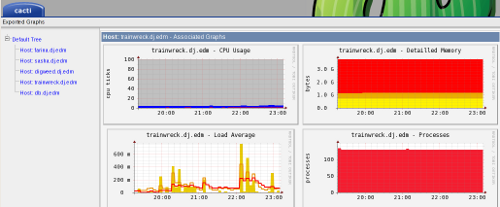
I have been using MRTG for a while but I always wanted graphs for more than network statistics. So I finally setup Cacti this week. It took me several nights of configuring but I finally got it setup like I want for my home network. The key for me was installing these cacti templates from Alexandre Dumont. I modified them slightly, and I may document the whole process on a friend’s wiki later.
Check out the finished product here, this is Cacti on my home network http://edm.homelinux.net/cacti-export/
client setup
install net-snmp package
use snmpconf or setup your /etc/snmp/snmpd.conf like this:
###########################################################################
#
# snmpd.conf
#
#   - created by the snmpconf configuration program
#

###########################################################################
# SECTION: System Information Setup
#
#   This section defines some of the information reported in
#   the system mib group in the mibII tree.

# syslocation: The [typically physical] location of the system.
#   Note that setting this value here means that when trying to
#   perform an snmp SET operation to the sysLocation.0 variable will make
#   the agent return the notWritable error code.  IE, including
#   this token in the snmpd.conf file will disable write access to
#   the variable.
#   arguments:  location_string

syslocation Lundy Dr

# syscontact: The contact information for the administrator
#   Note that setting this value here means that when trying to
#   perform an snmp SET operation to the sysContact.0 variable will make
#   the agent return the notWritable error code.  IE, including
#   this token in the snmpd.conf file will disable write access to
#   the variable.
#   arguments:  contact_string

syscontact Root root@trainwreck.dj.edm

###########################################################################
# SECTION: Access Control Setup
#
#   This section defines who is allowed to talk to your running
#   snmp agent.

# rocommunity: a SNMPv1/SNMPv2c read-only access community name
#   arguments:  community [default|hostname|network/bits] [oid]

rocommunity  trainwreck.dj.edm 192.168.2.0/24

#
# Unknown directives read in from other files by snmpconf
#
#com2sec notConfigUser  default       public
#group   notConfigGroup v1           notConfigUser
#group   notConfigGroup v2c           notConfigUser
#view    systemview    included   .1.3.6.1.2.1.1
#view    systemview    included   .1.3.6.1.2.1.25.1.1
#access  notConfigGroup       any       noauth    exact  systemview none none
#dontLogTCPWrappersConnects yes
- start the service
- service snmpd start
- test the service
- snmpwalk -v2c -c trainwreck.dj.edm 192.168.2.1
- should get a ton of output, CTRL + C it.
Add client to Cacti
Add client
- Console Create New Host
Description: hostname
Hostname: IP address
Host Template: Linux host (ucd/net-snmp)
SNMP Community: hawtin.dj.edm
Create graphs
- Console Create Graphs hawtin.dj.edm
Create: ucd 00 CPU Linux
Create: ucd 01 Load Average
Create: ucd 12 Detailled Memory
Create: ucd 15 Uptime
Create: ucd 20 Processes
Create: ucd 30 Users

Data Query [Unix - Get Mounted Partitions]

    Created graph: hawtin.dj.edm - CPU Usage
    Created graph: hawtin.dj.edm - Load Average
    Created graph: hawtin.dj.edm - Detailled Memory
    Created graph: hawtin.dj.edm - Uptime
    Created graph: hawtin.dj.edm - Processes
    Created graph: hawtin.dj.edm - Users
- The network and disk gathering didn’t work after initially adding the host.
- This data query returned 0 rows, perhaps there was a problem executing this data query. You can run this data query in debug mode to get more information.*
- Run the data query in debug
- Wait several hours and try again
- Create Graphs for this Host
Data Query [ucd 00 Lan]  Check eth0 box
Created graph: hawtin.dj.edm - Traffic - eth0
- ucd 10 fs
- this only shows used space, not free space
- instead use the Data Query Unix - Available Disk Space
- Console Create devices hawtin.dj.edm Associated Data Queries Add Data Query Unix - Get Mounted Partitions Add Create Graphs for this Host
Add client to Tree view
- Console Graph Trees Default Tree Tree Items Add
Tree Item Type: Host
Host: hawtin.dj.edm (192.168.2.2)