legacy-wiki
Ironic Baremetal Lab
Imported from the legacy wiki archive. The date above is inferred from the strongest available evidence and may represent a known range rather than the exact publication day.
- https://github.com/openstack/ironic
- https://github.com/openstack/bifrost/
- https://github.com/openstack/virtualbmc
bifrost infra setup
- vagrant plugin install cachier
- git clone https://github.com/jctanner/bifrost -b BAREMETAL_DEMOS
- cd bifrost/tools/vagrant_dev_env
- vagrant up
- vagrant ssh
- cd bifrost
- ./scripts/test-bifrost.sh
- prepare for visual connections
sudo apt-get install virt-manager
echo “$YOURKEY” >> /root/.ssh/authorized_keys
- get the atomic host image
cd /httpboot
sudo wget http://cloud.centos.org/centos/7/atomic/images/CentOS-Atomic-Host-7-GenericCloud.qcow2.gz
sudo gunzip CentOS-Atomic-Host-7-GenericCloud.qcow2.gz
- clean and then setup the nodes
cd ~/bifrost/tools
./clearnodes.py
./setupnodes.py
- ensure the vbmc ports are started
sudo vbmc list
for x in $(seq 1 3); do sudo vbmc start openshift${x}; sleep 1; done;
- put nodes into managed state
for x in $(seq 1 3); do ironic node-set-provision-state openshift${x} manage; done;
- put nodes in available state
for x in $(seq 1 3); do ironic node-set-provision-state openshift${x} provide; done;
- start the provisioning
for x in $(seq 1 3); do ironic node-set-provision-state openshift${x} active –config-drive http://192.168.122.1:8080/configdrive-4e41df61-84b1-5856-bfb6-6b5f2cd3dd11.iso.gz ; sleep 60; done;
- watch the job statuses
watch -n 10 ironic node-list
- wait for the nodes to settle
the cpus will be going nuts for a long time doing lots of dd/ldd/dracut operations (>45 minutes for all 6 nodes)
Jun 14 04:02:05 localhost systemd: Startup finished in 8.635s (kernel) + 46.458s (initrd) + 47min 42.966s (userspace) = 48min 38.060s.
triple-o infra setup
- start with a physical host
- git clone https://github.com/splitwood/tripleo-virt-quickstart
- cd tripleo-virt-quickstart/
- ./bootstrap.sh #* igore all errors if the final line is “bootstrap done. success”
- ./run.sh #* make sure you have ansible in your current user’s path #* you may need to disable the distro check task in tripleo-quickstart/roles/provision/support_check/tasks/main.yml if you are not using centos/rhel
- get the IP of the undercloud VM #* virsh dumpxml undercloud | fgrep mac … arp -e | fgrep $MAC
- ssh -i ~/.quickstart/id_rsa_undercloud stack@<UNDERCLOUDIP>
- follow through ironic setup docs #* https://github.com/splitwood/tripleo-undercloud-init-container
- get the macs for all of the baremetal VMs #* for X in $(virsh list –all –name | egrep ^bare); do echo $X; virsh dumpxml $X | fgrep ‘mac address’ | cut -d' -f2 ; done;
NOTES
- The libvirt URI is non-default in this environment. The playbooks will set LIBVIRT_DEFAULT_URI=qemu:///session for most of the tasks.
- The task to set autoboot on undercloud will fail
- https://bugs.launchpad.net/tripleo/+bug/1689620
- https://review.openstack.org/#/c/458193/5/roles/libvirt/setup/undercloud/tasks/main.yml
openshift installation
- create /etc/ansible/hosts per https://docs.openshift.com/enterprise/3.1/install_config/install/advanced_install.html#configuring-host-variables
- ansible-playbook -e openshift_disable_check=disk_availability,memory_availability openshift-ansible/playbooks/byo/config.yml
virtualbmc testing
Virtualbmc hooks directly into libvirt, so it needs to be running on the hypervisor. Once you add a VM to it, it must be instructed to start the bmc service before you can use ipmitool against it.
- create a blank VM with pxe boot titled <NAME>
- vbmc add <NAME> –username=admin –password=redhat –port=623
- vbmc start <NAME>
- ipmitool -v -I lanplus -U admin -P redhat -H 127.0.0.1 -p 623 power off|on
appendix
dnsmasq.conf.j2 patch
[root@localhost bifrost.checkout]# git diff playbooks/roles/bifrost-ironic-install/templates/dnsmasq.conf.j2
diff --git a/playbooks/roles/bifrost-ironic-install/templates/dnsmasq.conf.j2 b/playbooks/roles/bifrost-ironic-install/te
index 541dc0e..faf219b 100644
--- a/playbooks/roles/bifrost-ironic-install/templates/dnsmasq.conf.j2
+++ b/playbooks/roles/bifrost-ironic-install/templates/dnsmasq.conf.j2
@@ -62,7 +62,7 @@ domain={{ domain }}
 # repeat this for each network on which you want to supply DHCP
 # service.
 {% if testing | bool == true %}
-dhcp-range=192.168.122.2,192.168.122.254,12h
+dhcp-range=192.168.124.2,192.168.124.254,12h
 {% elif inventory_dhcp %}
 dhcp-range={{dhcp_pool_start}},{{dhcp_pool_end}},static,{{dhcp_static_mask}},{{dhcp_lease_time}}
 {% else %}
@@ -91,7 +91,7 @@ dhcp-boot=tag:gpxe,/ipxe.pxe

 dhcp-match=set:ipxe,175 # iPXE sends a 175 option.
 {% if testing | bool == true %}
-dhcp-boot=tag:ipxe,http://192.168.122.1:{{ file_url_port }}/boot.ipxe
+dhcp-boot=tag:ipxe,http://192.168.124.1:{{ file_url_port }}/boot.ipxe
 {% else %}
 dhcp-boot=tag:ipxe,http://{{ hostvars[inventory_hostname]['ansible_' + ans_network_interface]['ipv4']['address'] }}:{{ f
 {% endif %}
resources
- https://docs.openstack.org/developer/ironic/_images/states.svg
- https://github.com/jriguera/ansible-ironic-standalone
- https://github.com/jriguera/ansible-ironic-standalone/wiki/Using-Ironic-client-with-agent_ipmitool-driver
- https://github.com/jriguera/ansible-ironic-standalone/wiki/Cloud-Init-and-Config-Drive
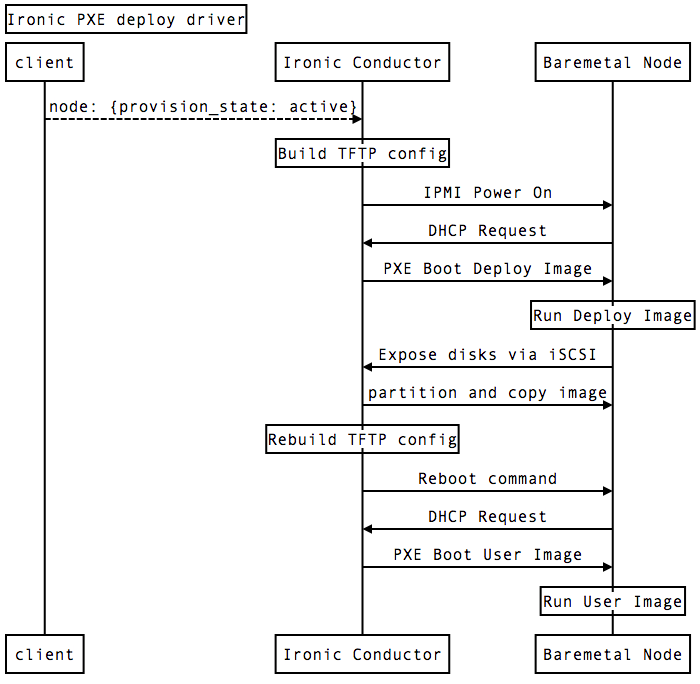
- https://raw.githubusercontent.com/jriguera/ansible-ironic-standalone/master/doc/ironic-sequence-pxe-deploy.png
- https://github.com/splitwood